What is unreal engine?
Unreal engine is a powerful 3D computer graphic games engine created by epic games. Firstly, it was used for PC first-person shooter games but has since been used throughout the industry to create lots of other games in different genres and been adapted and used within the film and television industry
What is epic games?
Epic Games is an American video game and software developer and publisher. It has many popular games, for example, one being fortnite
Industries that use unreal engine and what for:
Gaming- game development, virtual production, architectural visualisation, stimulation and interactive 3D experiences
Film-creating visual effects, developing environments, real time animation and cinematics
Architecture-material editor, lumen, path tracing and visible 3D recreations
Healthcare-medical stimulations,virtual reality therapy, educational tools, and patient education
Notable projects created with unreal engine
Tetris effect
Yoshis crafted world
Holeyship
Arid
soulweaver
Task
menu bar- Uses these menus to access common application actions, like saving, and creating new levels. You’ll also find options for opening editor windows and tools that are useful for specific functions like debugging and more.
main toolbar- Contains shortcuts for some of the most common tools and editors in Unreal Engine, as well as shortcuts to enter Play mode (run your game inside Unreal Editor) and to deploy your project to other platforms.
viewport toolbar- Includes common tools used to manipulate objects in the level by moving, rotating, and scaling them, as well as snapping tools for moving objects along a grid, rotation angle, or scaling amount. It also includes perspective and orthographic views along with debugging and visualization view mode and other settings you can use while working in the viewport.
level viewport- Displays the contents of your Level, such as Cameras, Actors, Static Meshes, and so on.
outliner- Displays a hierarchical tree view of all content in your Level.
details panel- Appears when you select an Actor. Displays various properties for that Actor, such as its Transform (position in the Level), Static Mesh, Material, and physics settings. This panel displays different settings depending on what you select in the Level Viewport.
content drawer- Opens the Content Drawer, a temporary Content Browser window, from which you can access all of the Assets in your Project.
bottom toolbar- Contains shortcuts to the Command Console, Output Log, and Derived Data functionality. Also displays source control status.
Fables research
What is a fable?
-fables are short fictional stories that typically feature anthropomorphized animals or objects and are designed to convey a moral lesson.
Fables typically embody straightforward virtues such as common sense and moderation, rather than lofty ethical ideals.
what do they have in common?
moral lessons: typically designed to teach about morals or give a lessons about human behaviour
anthropomorphised characters: animals or objects that are given human traits to enforce the moral
simple conflict and resolution: the stories in a fable typically have a conflict fixed with a simple solution
use of animals: fables often us animals as human characters to amplify the moral. this method helps to make effective tools for teaching and learning, providing children with a valuable lesson about right and wrong.
some examples:
- the frogs and the ox
- belling the cat
- the town mouse& the country mouse
- the wolf and the crane
what are fable stories?
a fable is a kind of story that teaches a lesson. fables usually are entertaining tales featuring animals that talk and behave as people do. because they have human traits the animals show how foolish or wise humans can be.
common tropes found in fables
fables follow some familiar patterns that make them powerful teaching tools:
a direct model: often written as a short sentence at the end, the moral focuses on values like honesty, patience, or kindness.
talking animals with human traits: each animal usually shows a specific quality, like the clever fox or the proud hare.
a clear problem or conflict: the main issue helps to show the lesson learnt.
simple settings: most stories happen in simple and generic places like forests, farms, or villages.
HOW TO TELL IS SOMETHING IS A FABLE STORY-
-usually a short and simple story
-has a clear lesson or shows morals
-can show a message that a child would understand
-animals and characters usually act human like and or carry traits of humans.
setting of fable stories
-domestic setting
such settings include the tiled roof of a house, a butchers shop, wells, a pot of jam, a cottage window, jar of nuts and figs.
-celestial and exotic
specific geographical references are sparse, but some tales contain allusions to places, such as a tale concerning an Arab and a camel, a tale set in the fields near Rome, the mythical land of the gods. some of the other more exotic backgrounds would include lions, giraffes or monkeys
there are many other types of settings such as earthly and hazardous.
Platform games common conventions
- Power ups
- Continuous movement
- Smaller appearing characters
- Collectables
- Colourful, bright aesthetics
- Levels that gradually get harder
- Linear (left to right)
- unrealistic
deepest sword
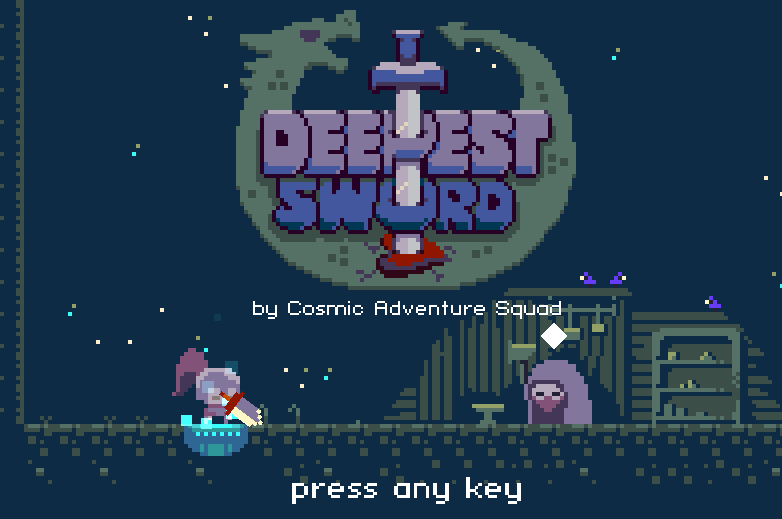
the game was created by Cosmic Adventure Squad and was released April 6th 2021. the game was sort of confusing to play, expecting you to kill a dragon with a sword but not telling you how to do it. following along with this, that’s why i found the game tricky since the actions were unclear. it was a really unique way to move around, the position of the sword depicting if you could move forwards or backwards, and having to use the sword to climb. the main character was a knight, there were a few npcs as the game started which told you how to move and what your objective was. also, one thing i didn’t like was the game just repeated but with each turn you gained a bigger sword, but that made movement even more difficult and i kept getting stuck. the back ground was a cave like structure but im not very sure.
vapour trails
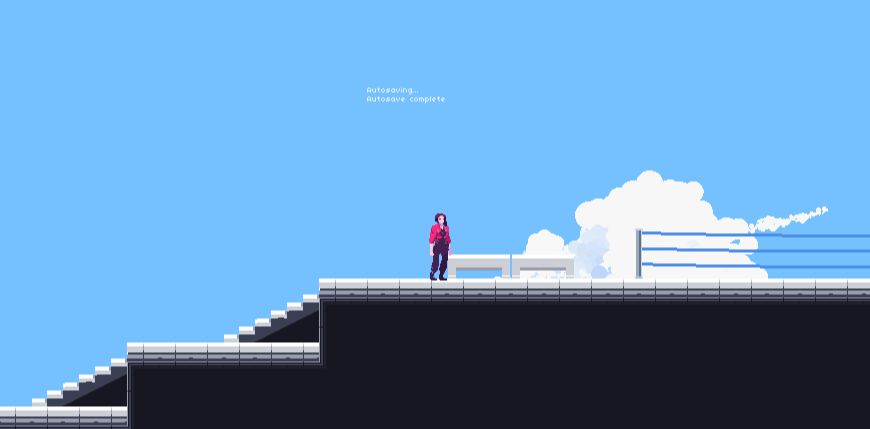
the game was created by sevencrane and released on the 3rd of January 2018. the game was fun and the dialogue was amusing, having a comical take. although it was tricky to grasp since the instructions were not very clear, leaving me stuck clueless in the first fight. the movement was easy, the character having a long jump making travel efficient. the main character was a model seeking revenge for her treatment, from what i gathered, and she had to fight other models who were competing for top role, out of jealousy. the background started in sort of a lab and progressed t a seaside dock.
zombotron reboot
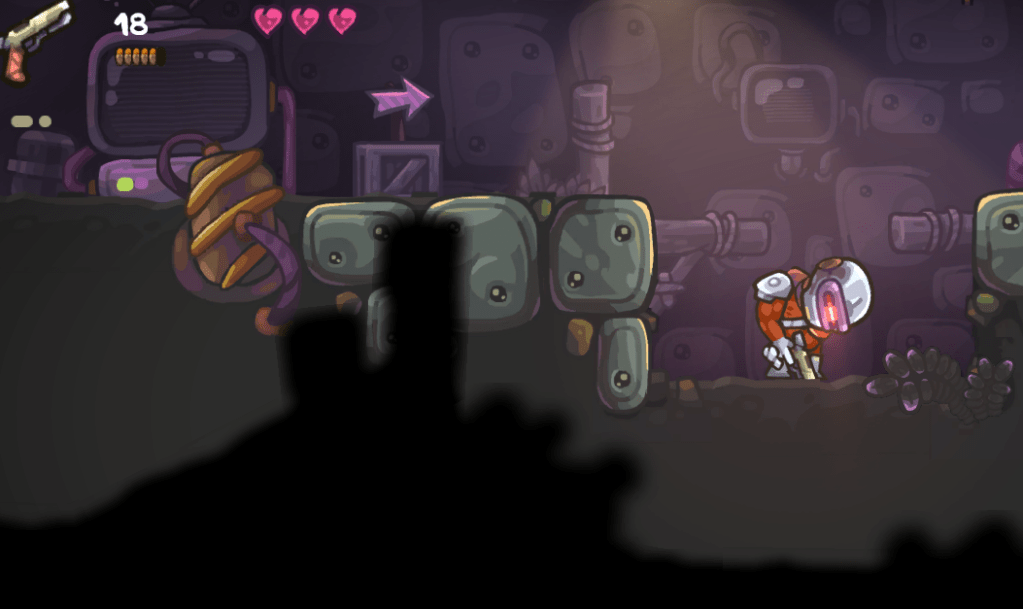
The game was published by AntKarlov on November 21st 2023. The game was fun to play having a unique way of movement as your mouse was the direction the gun followed. The game wasn’t very difficult it was simple to understand and fun to play. It felt good to move around and the walking animation was fun. The back ground seemed like an underground cavern/lab almost , littered with gas canisters that exploded and lifts you had to take up and down.
Building a house in unreal engine
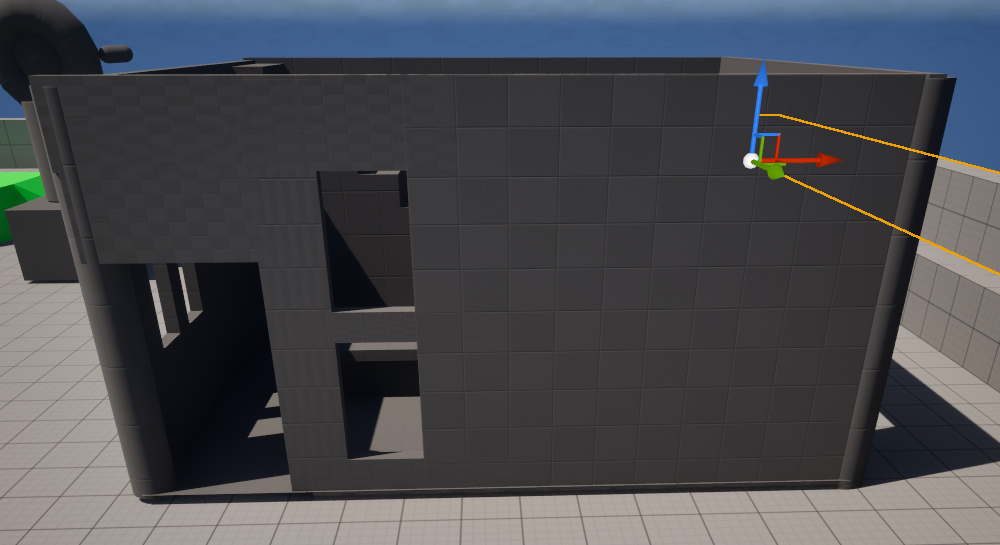
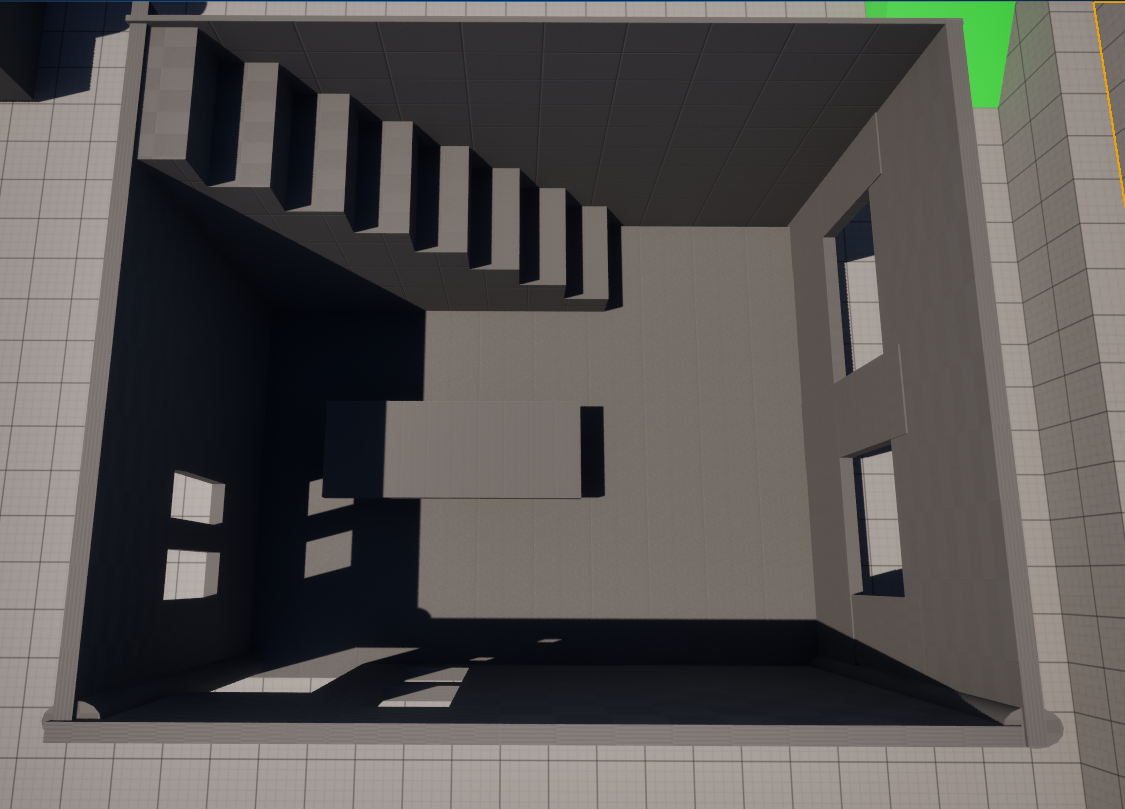
in unreal engine, I made a 3d house. to do this, I used selection mode and tools to create simple shapes, moulding them as I wanted to use them. I used cubes to create the foundations of my house, I didn’t move onto a second floor and was unhappy with the way all my shapes connected, making it look blocky and uneven in lots of places. at first I added a roof but I didn’t know how to add or adjust the lighting so the inside was dark and you couldn’t see it.
naming conventions
naming conventions means to give a file a name that is easy to find and can be tracked and shared easily. without these conventions it can become very easy for files to get lost or become very confusing.
a few examples of conventions are:
- Blueprints- BP_
- widget blueprint (UI)- WBP_
- level/map- MP_
- enumeration- E_
- menu- MN_
form for platform games: https://forms.gle/w33q6x2otSfWmdTy7
what kind of gamer am i?
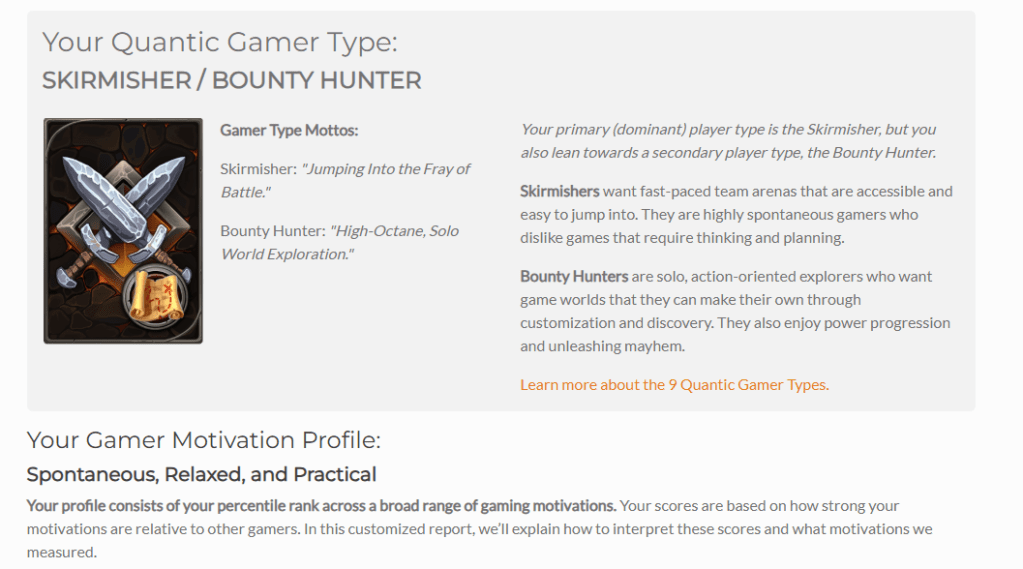
I agree with my results since I like action filled games where its all about having fun, rathe than having to have a set plan and strategy for every aspect of the game. I like playing with my friends and just having fun. also I like the exploration aspect of some games, being able to play a game however you want to.
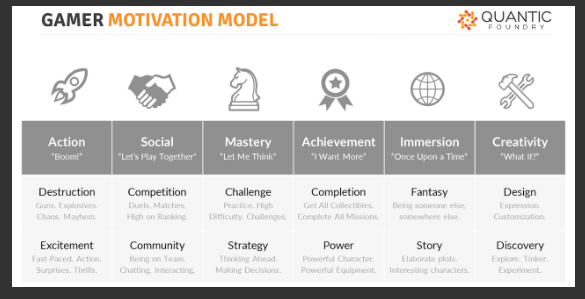
the gamer motivation model is a way to reflect every gamer and how they choose games, and the type of games they enjoy. it shows the diversity throughout games, how every player has the common aspect of being a gamer but could like completely different types of games. it shows how there’s something for everyone,
Designing a level for a platform game
- Environment (feed into the mechanics)
- Placement of platforms
- Checkpoints
- Start and finish (left-right ect)
- Collectables
- Enemy placement
- Platform mechanics
- Secrets
- What is the goal?
- Flow of the level
players “getting into the flow”: acting instinctively, immersed in the game
Nintendo level design research
- The star is the main mechanic of the level so they place this in a safe zone, this is so players feel safe and secure to use and find out what the star does and why its there.
- The difficulty will climb up to a checkpoint, this is so the player doesn’t need to repeat any levels or challenges.
- harder levels are usually after a more relaxed level, so the player isn’t already really frustrated. it allows people with different skill levels to still be able to progress. the difficulty varies with a linear pattern.
- no more than 4 or 5 enemies on the screen at once, usually 2 or 3, yet the placement of the enemies adds to the difficulty.
- enemies that are above Mario are far more difficult for him to deal with because of the jump mechanics
- optional challenges and secrets give varieties to the levels
- they value exploration over their own level design, rewarding the player for finding secrets
Task: independent level design research
Sponsored, A. (2020) Insights into adaptation game design challenges, GamesIndustry.biz. Available at: https://www.gamesindustry.biz/insights-into-adaptation-game-design-challenges (Accessed: 01 October 2025).
player input:
definition: the rule set for how players use platform peripherals to control the game
- player input is separated into many categories based upon gaming platforms (pc, controller, touch or hybrid controller and touch)
- each set of rules and functions changes upon the platform used
- this creates a challenge as the make a united experience on the game across al gaming platforms used ( designing features or shortcuts with mouse and keyboard and having to recreate those abilities with a controller)
user flow:
Definition: the user interface navigation, interaction and feedback rule set.
it can be often difficult to define clear cut categories so you must keep in mind the following:
- Game genre
- Single player vs. multiplayer modes
- In-game menu granularity (amount of detail put into the menu)
- In-world interaction complexity (difficulty of navigating or influencing the real world aspect)
user interface visual design:
definition: the art style, graphic design and layout of the UI (user interface)
the UI visual design is usually determined by the games established art direction. For tailoring purposes, it can be broken down into several relevant components.
- Menu and HUD layouts
- graphic design elements
- UI art style
blueprints in unreal engine:
what are they?
blueprints in unreal engine area powerful visual scripting system that allows developers to create gameplay elements using a nose-based interface. (node-based interface- used assign a new value to a variable.) this provides designers with a wide range of scripting concepts and tools.
what is the purpose of blueprints?
the primary purpose of blueprints is to provide a detailed plan that helps to guide the construction process. they serve as a reference to ensure that everybody involved with the construction of something is fully informed and knows how to go about creating it, and what the desired outcome is. they are essential for clear communication, accurate planning, and the efficiency of the construction stages. they help reduce the risk of errors and keep up with the schedule, the project within budget and keep clear communication within all parties of the production.
what is the blueprint editor and its main components?
the blueprint editor is a powerful tool in unreal engine that allows users to create and edit visual scripts to drive various aspects of their game. it is a node-based graph editor that enables the creation and editing of visual scripting node networks, commonly referred to as blueprints. the blueprint editor provides a context-sensitive design that allows users the functionality for objects they need or want to use whilst also offering flexibility for unconventional tasks. is has several tools and provides built-in debugging and analysis tools to improve data flows in networks.
main components:
- event graph
- components panel
- details panel
what are the benefits and drawbacks of using blueprints instead of c++?
c++ – a cross-platforming programming language that is widely used to create high-performance applications
benefits:
- visual scripting: Blueprints provide a visual scripting language that is intuitive and user-friendly, allowing designers and artists to create complex game logic and behaviours without traditional coding knowledge
- rapid prototyping: blueprints enable rapid prototyping and iteration, allowing developers to make changes and see results without compiling code, which accelerates the development cycle.
- accessibility: blueprints are designed to make game development more accessible to a wider range of creators, including those who may not have a deep understanding of programming.
drawbacks:
- performance: blueprints can become unwieldy and difficult to read when dealing with more intricate systems or large amounts of data
- scalability and maintainability issues: visual scripting gets messy as projects grow, large graphs are harder to read and debug, no compile-time type checking as strict as C++ so some errors only apply at runtime.
- limited low-level control: some engine-level features and optimizations are only accessible via C++, you cant easily modify unreal engines source or extend core systems purely with blueprints.
- larger build sizes and load times: blueprints-heavy projects can have ;larger packaged sizes and slightly longer load times due to VM interpretation overhead
3 examples of things that can be created in blueprints:
- toggle-able flashlight: a simple toggleable flashlight that animates open when the player gets nearby
- door animation: a door that opens and closes with a simple animation
unreal engine blueprint
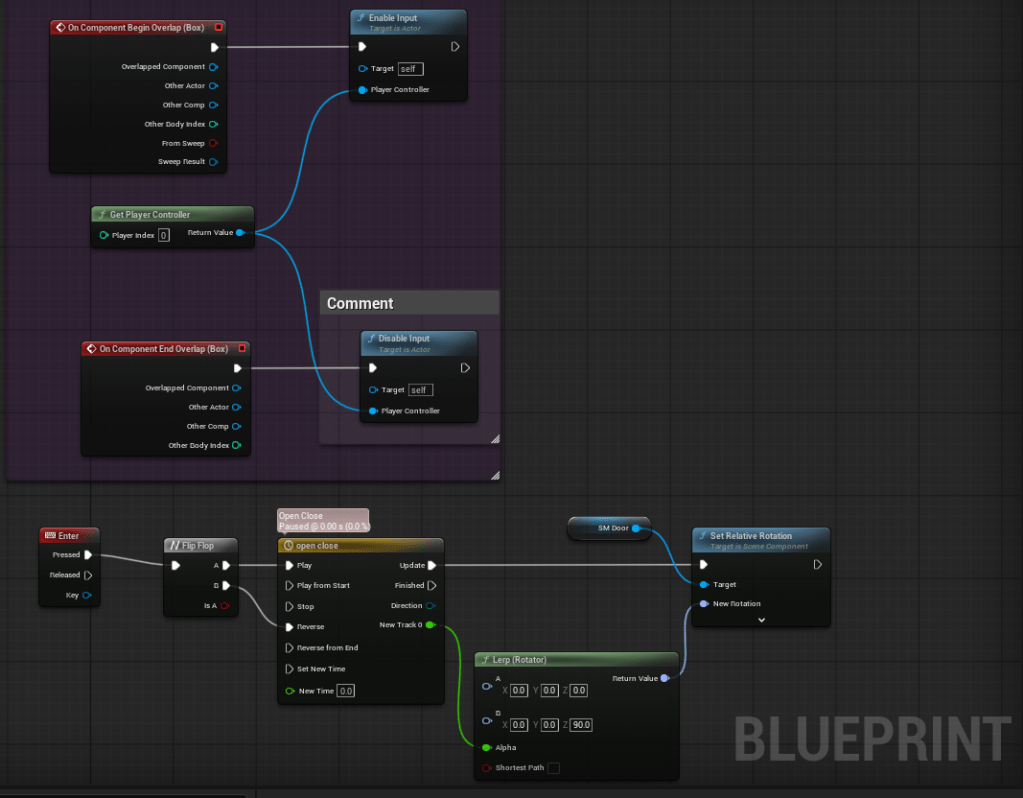
The purple box shows the code that allows the character to open the door, creating the action desired. I didn’t entirely enjoy the process at all but it was a good experience.
implementing animations
Keywords:
- Sprite Sheet
- Animation Source
- PaperZD Plug in
- Blueprint
- Idle/Run Animation
Research:
what is a sprite sheet?
a single image file that contains multiple smaller images, known as sprites, arranged in a grid-like pattern
what games use a sprite sheet, give examples.
- super mario bros. (1984)
- sonic the hedgehog (1991)
- street fighter (1991)
what sprite sheets can be used for
- character animations
- backgrounds and environments
- UI elements
- special effects
- web graphics
what is a flipbook in unreal engine?
a flipbook in unreal is a series of images or sprites that are displayed in a sequence to create an animation, similar to a hand drawn animation. each frame in a flipbook contains a sprite and a duration for which it is shown. the pace of the animation is controlled by the FPS (frames per second).
what is paperZD and what is its purpose?
PaperZD is a plugin for Unreal Engine that serves as an answer for unreal`s lack of support for 2D based games. it helps users create complex animated characters by binding the logic similarly to 3D development, while adjusting the experience to better serve a 2D game
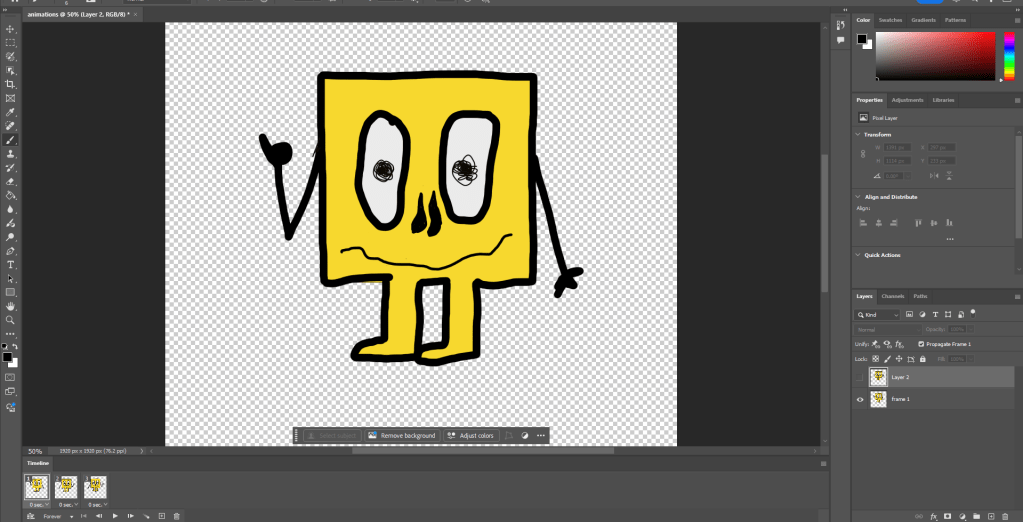
this is the doodle i did for our small example of an animation, the arms move and the pupils shake. i struggled at first creating this being unsure on how to navigate the layers but i eventually got the hang of it, although not leaving myself alot of time to make many layers so not as much movement.
Importing sprites into unreal engine
first off i opened a blank template in unreal and opened the paperzd plugin so that i could create a flipbook with the sprites.
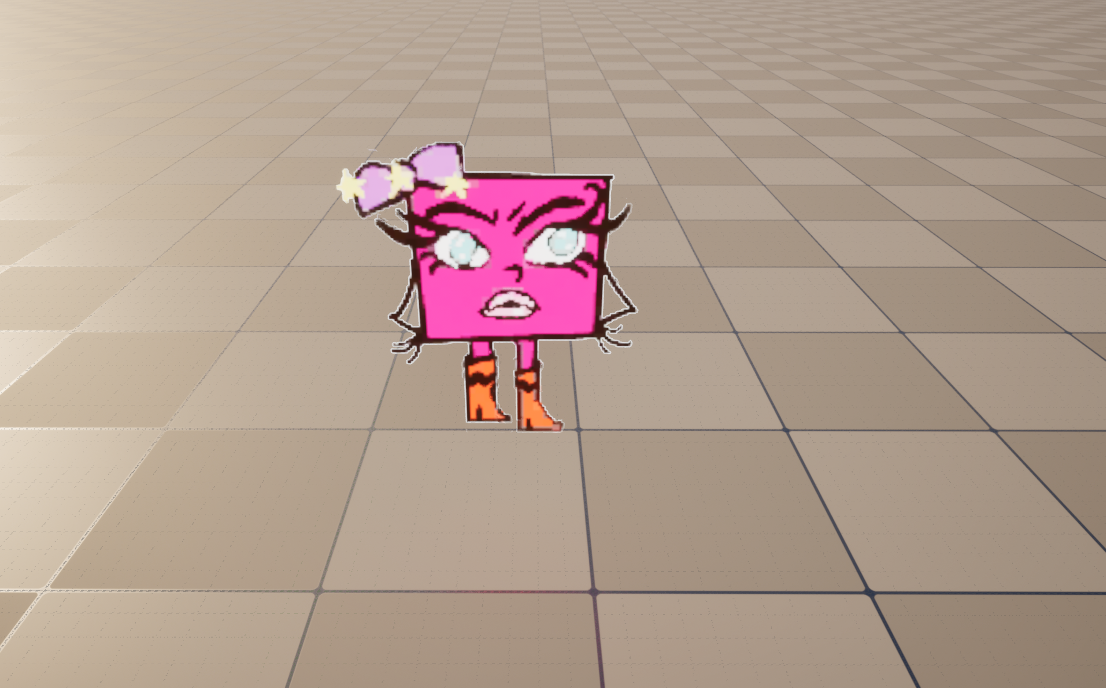
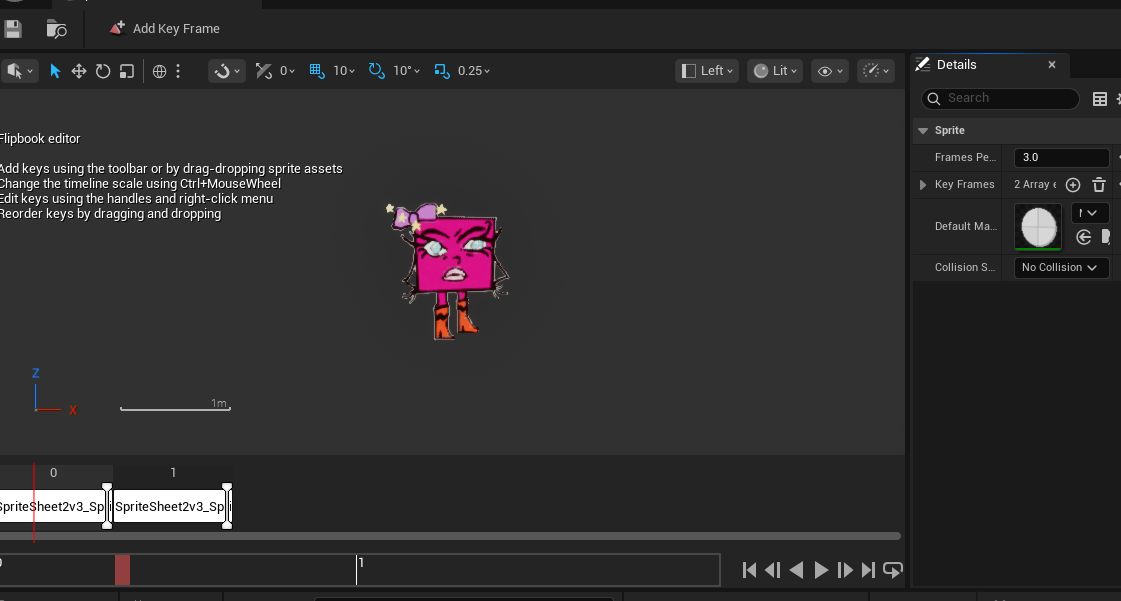
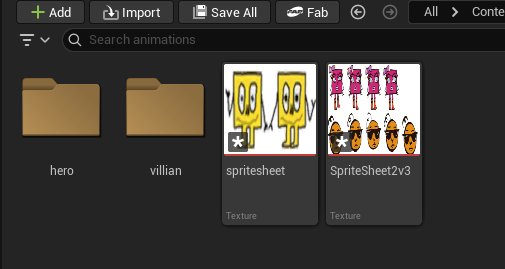
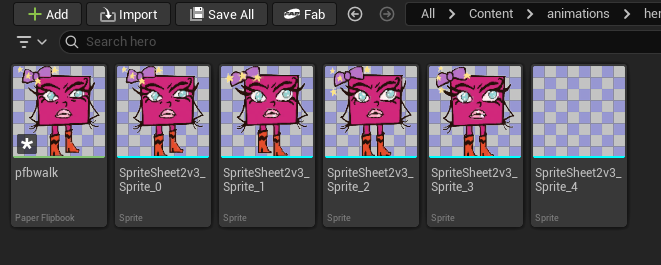
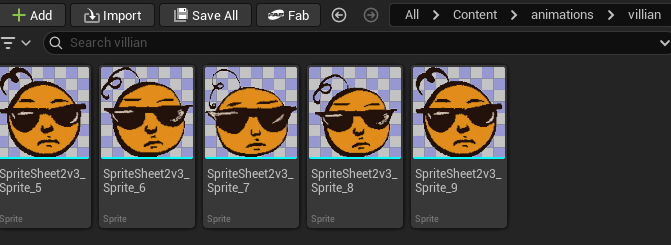
we created folders in our content drawer to keep everything tidy and organised. these consisted off three files. hero and villain and one to house both of those files. this allows everything top be easily discovered and maintained. once I had done this I selected the first two versions of my sprites and right clicked to create a flipbook. at first the animation was far to fast so I had to change the frames from 15 to 3 and also had to change the grid details to ones i used when creating my sprite which was 128 by 128. once i had done this i was able to just drag the new flipbook into unreal shown in my pictures above.
 lace's games journal!